
What is file access governance?
File access governance is the process of controlling, monitoring, and auditing who can access, share, edit, or download files across an organization. In SaaS environments like Google Workspace and Microsoft 365, file access governance helps IT and security teams prevent oversharing, reduce data exposure, enforce compliance policies, and automate remediation when sensitive files are shared incorrectly.
For modern organizations, files are no longer stored in one centralized location. They live across cloud drives, shared folders, collaboration tools, and SaaS applications. Employees share files with coworkers, contractors, partners, vendors, and personal accounts—often without realizing the security implications. File access governance gives organizations the visibility and control they need to keep collaboration secure.
File access governance definition
File access governance refers to the policies, processes, and technologies used to manage access to business files. It defines who should have access to specific files, what level of access they should have, how access should be approved, and when access should be removed.
At its core, file access governance helps organizations answer critical questions such as:
- Who has access to sensitive files?
- Which files are shared externally?
- Are any files publicly accessible?
- Do former employees, contractors, or vendors still have access?
- Are users over-permissioned?
- Can IT quickly remove risky or unnecessary access?
A strong file access governance program helps ensure that only the right people have the right access to the right files at the right time.
Why file access governance matters
File access governance is important because improper file access can lead to data leaks, regulatory violations, insider threats, and reputational damage. When employees can freely share sensitive files without oversight, organizations lose control over where data goes and who can view it.
Sensitive business files may include:
- Customer data
- Employee records
- Financial documents
- Legal files
- Source code
- Strategic plans
- Intellectual property
- Healthcare or personally identifiable information
Without effective governance, these files may be shared with the wrong users, retained by former employees, exposed through public links, or accessed by third-party accounts that should no longer have permission.
File access governance reduces these risks by creating a structured approach to visibility, policy enforcement, access reviews, and remediation.
File access governance vs. file sharing governance
File access governance and file sharing governance are closely related, but they are not exactly the same.
File access governance focuses on who can access files and what they can do with them. This includes permissions such as view, comment, edit, download, copy, or share.
File sharing governance focuses more specifically on how files are shared, especially outside the organization. This includes external sharing links, shared drives, public files, personal email accounts, private domains, and partner or vendor access.
For SaaS-first organizations, file sharing governance is an essential part of file access governance. Tools like Google Drive, Microsoft OneDrive, SharePoint, and other collaboration platforms make it easy to share files quickly. That convenience can create hidden risk when IT teams do not have a clear view of external access.
How file access governance works
File access governance typically includes several core components:
Access policies
Access policies define who can access specific files, folders, drives, or repositories. These policies should be based on business need, data sensitivity, regulatory requirements, and internal security standards.
For example, a policy may state that finance files can only be accessed by members of the finance team and approved executives, or that customer data cannot be shared with personal email accounts.
Role-based access controls
Role-based access control, or RBAC, assigns permissions based on job responsibilities rather than individual requests. This simplifies access management by grouping users with similar needs.
For example, HR team members may receive access to employee records, while sales team members may receive access to customer-facing collateral. When employees change roles, their access can be updated based on their new responsibilities.
Least privilege access
The principle of least privilege means users should only receive the access they need to do their jobs—and nothing more. This limits the potential damage caused by compromised accounts, insider threats, or accidental oversharing.
Least privilege access is especially important in SaaS environments, where users often accumulate permissions over time as they join new projects, teams, or shared drives.
Access reviews
Access reviews help IT and security teams verify whether existing permissions are still appropriate. These reviews can uncover files shared with former employees, unnecessary external collaborators, personal accounts, or inactive users.
Regular reviews are essential because access needs change constantly. Employees change roles, contractors complete projects, vendors rotate, and business relationships end.
Monitoring and auditing
Monitoring and auditing provide visibility into access behavior. They help organizations detect suspicious activity, identify risky sharing patterns, and maintain records for compliance.
For example, an audit may reveal that a confidential document was shared with an external domain, downloaded by an unexpected user, or made publicly available through a link.
Automated remediation
Manual file access cleanup can be slow and error-prone, especially in large SaaS environments. Automated remediation helps IT teams quickly revoke risky access, remove public links, unshare files from unauthorized domains, or notify users when they violate sharing policies.
Automation makes file access governance more scalable and helps lean IT teams respond faster to potential data exposure.
Why file access governance matters in SaaS environments
SaaS has changed the way organizations collaborate. Employees can create, store, and share files from anywhere, often across multiple cloud-based applications. While this improves productivity, it also makes file access harder to govern.
In SaaS environments, common file access risks include:
- Files shared with personal email accounts
- Public links that expose sensitive data
- Former employees retaining access to files or folders
- Contractors and vendors keeping access after projects end
- Shared drives with overly broad permissions
- Sensitive files shared with unauthorized external domains
- Lack of visibility into who can access what
- Manual access reviews that do not scale
These risks are especially challenging for lean IT teams responsible for managing large numbers of users, apps, files, and external collaborators.
File access governance helps SaaS-first organizations secure collaboration without slowing employees down. Instead of relying on manual cleanup, IT teams can use policies, automation, and continuous monitoring to reduce risk while preserving productivity.
Common file access governance challenges
Even with strong security intentions, many organizations struggle to manage file access effectively. The most common challenges include limited visibility, inconsistent policies, and access that becomes outdated over time.
Lack of visibility
IT teams often do not have a complete view of which files are shared externally, which users have access, or whether sensitive files are exposed through public links. Without visibility, it is difficult to prioritize risk or take corrective action.
Over-permissioned users
Employees often receive more access than they need. This can happen when users are added to shared folders, inherited permissions are not reviewed, or access is never removed after a project ends.
External sharing risk
External collaboration is necessary, but it creates risk when files are shared with personal accounts, unmanaged domains, former partners, or users outside approved business relationships.
Manual access reviews
Manual access reviews are time-consuming and difficult to maintain at scale. As organizations grow, the number of files, users, shared drives, and external collaborators can become overwhelming.
Offboarding gaps
When employees, contractors, or vendors leave, their file access must be removed quickly. Missed offboarding steps can leave sensitive files exposed to users who no longer need access.
Compliance complexity
Regulations and internal policies often require organizations to demonstrate that sensitive data is protected and access is controlled. Without clear audit trails, proving compliance can be difficult.
File access governance best practices for IT teams
A strong file access governance strategy should combine clear policies, regular reviews, automation, and employee education. The following best practices can help organizations reduce risk and improve operational efficiency.
1. Define clear file access policies
Document who can access specific types of files, when external sharing is allowed, and what types of data require additional protection. Policies should be easy for employees to understand and practical for IT to enforce.
2. Use least privilege access
Grant users only the access required for their current role. Avoid broad permissions whenever possible, especially for sensitive files, shared drives, and externally accessible folders.
3. Use role-based access control
Assign access based on roles, teams, or departments instead of managing each permission individually. RBAC reduces administrative overhead and creates more consistent access decisions.
4. Review access regularly
Conduct recurring reviews to identify outdated, excessive, or risky permissions. Pay special attention to externally shared files, inactive users, former employees, contractors, and shared drives.
5. Monitor external sharing
Track files shared outside the organization, especially those shared with personal accounts, public links, or unauthorized domains. External sharing should be governed by clear policies and monitored continuously.
6. Automate remediation
Use automation to remove risky access, revoke public links, clean up unnecessary permissions, and notify users when policy violations occur. Automation helps IT teams respond faster and reduces manual work.
7. Integrate governance into onboarding and offboarding
File access should be tied to the employee lifecycle. New employees should receive appropriate access based on their roles, and departing employees or contractors should have access removed promptly.
8. Train employees on secure collaboration
Employees need to understand how file sharing decisions affect security. Regular training can help users identify sensitive data, follow sharing policies, and avoid risky behavior.
File access governance and regulatory compliance
File access governance supports compliance by helping organizations control and document access to sensitive data. Regulations and frameworks such as GDPR, HIPAA, SOC 2, ISO 27001, and other privacy or security requirements often expect organizations to protect sensitive information and limit access appropriately.
Governance helps support compliance by:
- Enforcing access policies
- Maintaining audit trails
- Supporting access reviews
- Reducing unauthorized access
- Identifying risky external sharing
- Demonstrating control over sensitive files
Compliance is not only about passing audits. It is also about building repeatable processes that reduce the chance of data exposure.
Preventing data breaches and insider threats
Unauthorized file access can come from external attackers, careless employees, or malicious insiders. File access governance helps reduce each of these risks.
For external threats, governance limits the amount of data exposed if an account is compromised. A user with least privilege access can cause less damage than a user with broad access across shared drives and sensitive folders.
For accidental insider risk, governance helps detect and remediate oversharing before it turns into a breach. Employees may not realize that sharing a file with a personal account, public link, or external domain creates risk.
For malicious insider threats, monitoring and auditing can help identify unusual behavior, such as unexpected file downloads, access to sensitive folders, or sharing activity that falls outside normal patterns.
How automation improves file access governance
Automation is essential for effective file access governance because SaaS environments change too quickly for manual processes alone. Users join, leave, change roles, create files, share links, and collaborate externally every day.
Automated file access governance can help IT teams:
- Discover risky file sharing
- Identify files shared externally
- Remove unauthorized access
- Revoke public sharing links
- Clean up stale permissions
- Trigger alerts for suspicious activity
- Notify users about policy violations
- Support access reviews and audits
Automation also helps lean IT teams scale governance without adding unnecessary administrative burden. Instead of chasing individual permissions manually, IT can define policies and workflows that enforce governance continuously.
File access governance for Google Workspace and Microsoft 365
Google Workspace and Microsoft 365 are two of the most common environments where file access governance becomes critical. Employees rely on tools like Google Drive, Shared Drives, OneDrive, and SharePoint to collaborate internally and externally.
These platforms make file sharing simple, but they can also make access difficult to control. Files may be shared with external users, inherited through folders, exposed through links, or retained by users who no longer need them.
Effective governance for Google Workspace and Microsoft 365 should include:
- Visibility into internal and external file sharing
- Detection of public or risky links
- Controls for shared drives and folders
- Policies for personal email accounts and external domains
- Automated cleanup of outdated permissions
- Support for access reviews and audit reporting
By governing file access across these collaboration platforms, organizations can reduce risk while allowing employees to work efficiently.
The future of file access governance
File access governance will continue to evolve as organizations adopt more SaaS applications, use more AI-powered tools, and collaborate with more external partners. The number of files, users, and sharing relationships will only continue to grow.
Future-ready governance programs will rely more heavily on automation, real-time monitoring, user behavior insights, and zero trust principles. Instead of assuming that access is safe because a user is inside the organization, zero trust requires continuous verification based on identity, context, device, behavior, and business need.
As SaaS environments become more complex, organizations will need governance tools that adapt quickly, integrate across platforms, and support both security and productivity.
How BetterCloud helps automate file access governance
BetterCloud helps IT teams manage and secure SaaS environments, including file access and file sharing risk. With BetterCloud File Governance, formerly Tricent, organizations can gain visibility into risky file sharing, automate remediation, and enforce policies across cloud collaboration environments.
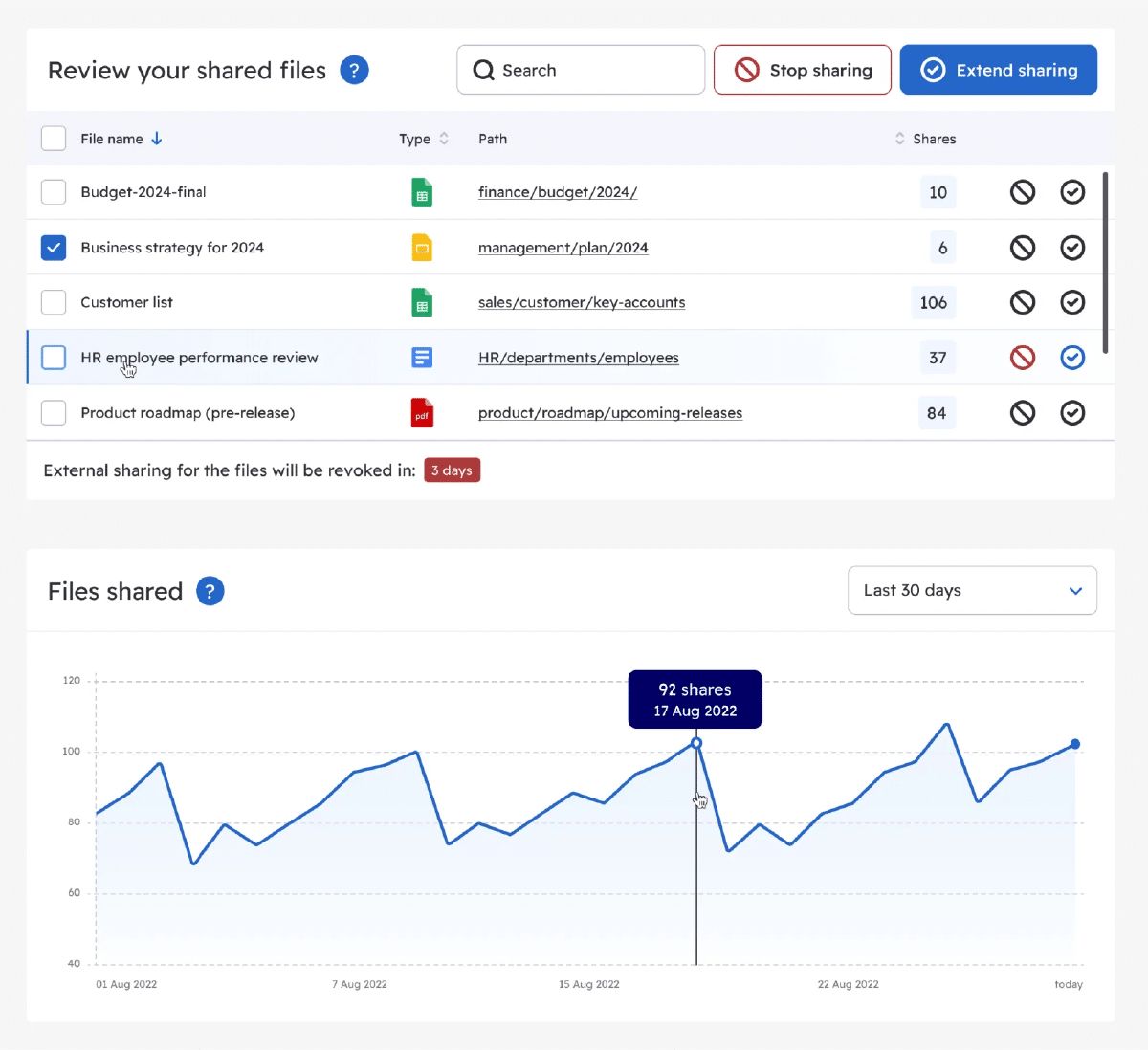
BetterCloud File Governance helps teams identify external sharing risk, clean up excessive access, remove inappropriate sharing, and empower end users to resolve policy violations. This gives IT teams a more scalable way to manage file governance without relying on manual reviews alone.
For lean IT teams, BetterCloud can help answer important file access questions, such as:
- Which files are shared outside the organization?
- Which files are shared with personal accounts?
- Which shared drives contain risky access?
- Which external users still have access to sensitive files?
- Which files need remediation?
- How can IT clean up access at scale?
By combining visibility, automation, and policy enforcement, BetterCloud helps organizations reduce file-sharing risk while supporting secure collaboration.
Conclusion
File access governance is essential for protecting sensitive data in today’s SaaS-first workplace. As employees create, store, and share files across cloud platforms, IT teams need a scalable way to control access, monitor risk, and remediate oversharing.
A strong file access governance strategy helps organizations reduce data exposure, support compliance, prevent insider threats, and maintain secure collaboration. By combining clear policies, least privilege access, regular reviews, and automation, IT teams can protect business-critical files without slowing productivity.
BetterCloud File Governance makes this easier by helping organizations discover risky file sharing, clean up excessive access, automate remediation, and enforce policies across SaaS environments.
Ready to reduce file-sharing risk across your SaaS environment? Explore BetterCloud File Governance to see how automation can help your IT team protect sensitive files, maintain compliance, and secure collaboration at scale. Made for lean IT teams like yours, try our interactive demo or reach out to learn how BetterCloud can help your company now.
File access governance FAQ
File access governance is the process of defining, enforcing, monitoring, and auditing who can access files across an organization. It helps ensure that only authorized users can view, edit, share, or download sensitive files.